The Problem With Context Windows
Every message you send to Claude costs tokens. That’s obvious. What’s less obvious is how many of those tokens are actually necessary.
When you’re using Claude Code for a long session, your prompts get bloated with tool outputs, file contents, repeated context, and verbose CLI responses. The model needs to process all of it — and you pay for all of it.
I started wondering: what if I could compress those prompts before they reach the API, without the model noticing?
The Idea: A Transparent Proxy
The approach is simple. Instead of pointing Claude Code directly at api.anthropic.com, you point it at a local FastAPI server. That server:
- Receives the request
- Compresses the
userandsystemmessage content - Forwards the compressed request to Anthropic
- Streams the response back unchanged
Claude never knows the prompts were compressed. You just see smaller token counts and a lower bill.
# Before: direct to Anthropic
export ANTHROPIC_BASE_URL=https://api.anthropic.com

# After: through the proxy
export ANTHROPIC_BASE_URL=http://127.0.0.1:9099
That’s the entire integration. Everything else — tool calls, streaming, model selection — passes through untouched.
The Compression Models
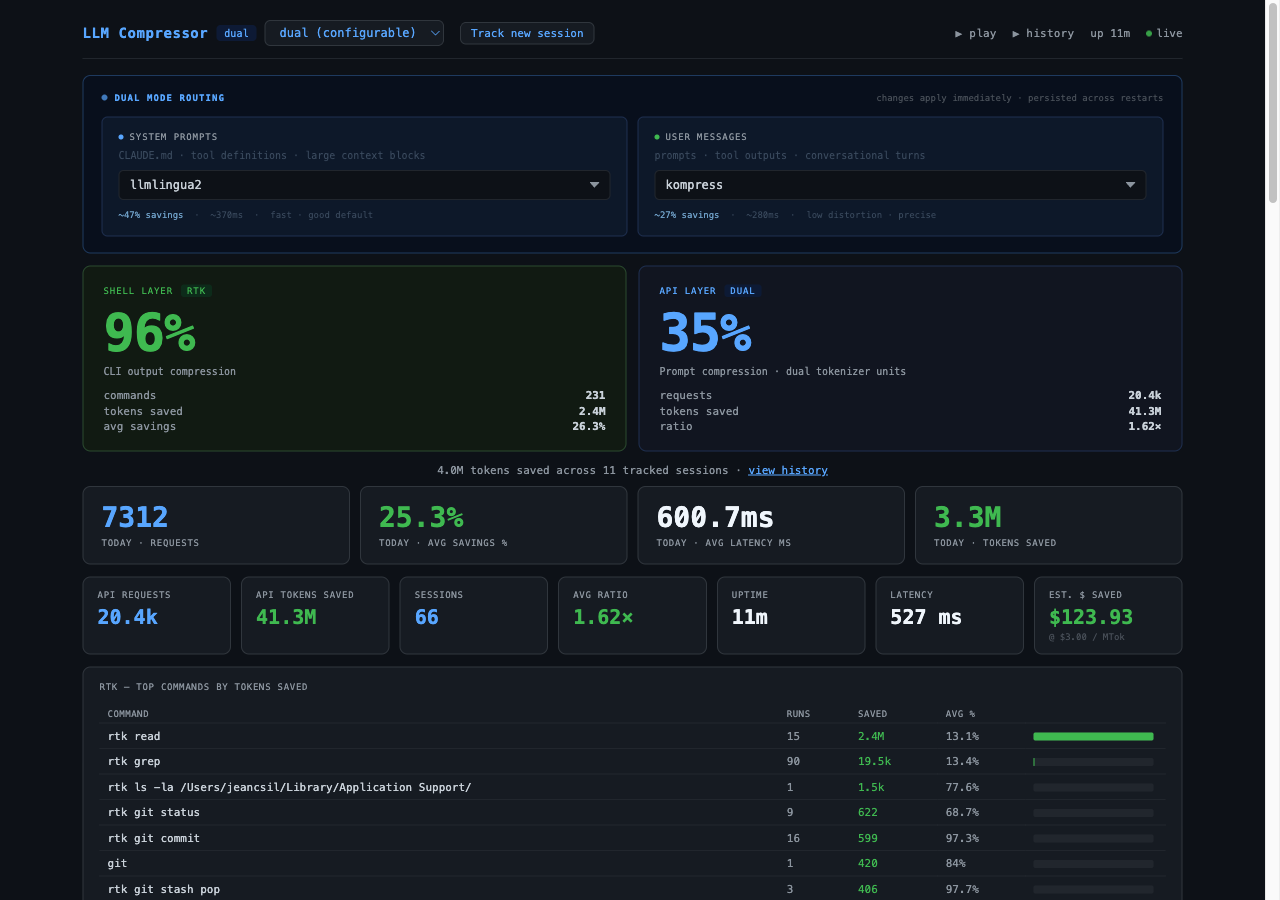
The proxy supports three backends, each with different tradeoffs:
| Model | Avg Savings | Speed | Notes |
|---|---|---|---|
llmlingua2 | ~47% | Fast | Default; multilingual BERT base |
llmlingua2-large | ~52% | 3× slower | XLM-RoBERTa large; more aggressive |
kompress | ~27% | Medium | Lower distortion; precision-oriented |
dual | Best of both | Slower startup | Routes by message type; sub-models configurable via dashboard |
LLMLingua-2 is Microsoft’s prompt compression model. It uses a classification head trained on meeting transcripts to identify which tokens are essential. The result reads like a telegram — grammatically rough, but semantically intact.
Kompress is more conservative. It preserves more linguistic structure, which matters when the prompt contains instructions or code that the model needs to follow precisely.
Dual mode routes each message type to the best model for it: aggressive compression for large system prompts, precision compression for user turns. It loads both models (~1.5 GB RAM total), but the quality improvement is noticeable.
You can switch models at runtime via the dashboard or a single curl:
curl -s -X POST http://127.0.0.1:9099/admin/set-model \
  -H 'Content-Type: application/json' \
  -d '{"model": "dual"}'
Handling the 512-Token BERT Limit
LLMLingua-2 uses a BERT-based tokenizer, which has a hard limit of 512 tokens per call. Real Claude Code prompts are often much longer than that.
The proxy solves this with a chunking pipeline:
- Try paragraph splits (
\n\n) - Fall back to line splits if paragraphs are still too long
- Fall back to sentence splits
- As a last resort, split by character count (~1400 chars ≈ 400 BERT tokens)
Each chunk is compressed independently and then reassembled. This avoids the silent truncation bug you’d hit by passing an oversized prompt directly to the model.
The Dashboard
The proxy ships with a live dashboard at http://127.0.0.1:9099/dashboard.
It shows:
- Overall savings % — the headline number
- Requests today vs all-time
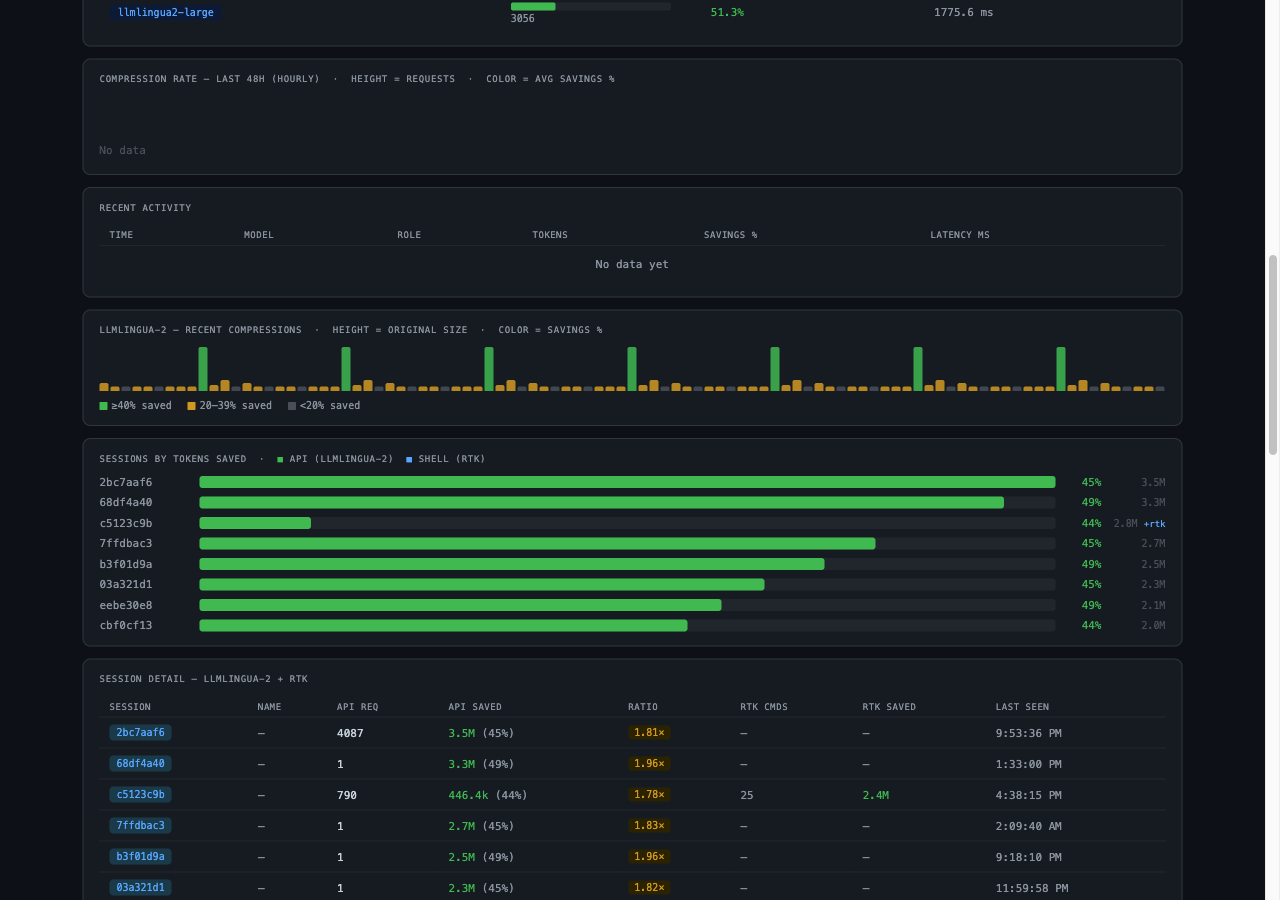
- Per-session bars — which Claude Code sessions are compressing the most
- 48-hour timeseries — compression rate over time
- Recent activity table — model, role, tokens in/out, latency per request
- Model comparison — if you’ve used multiple backends, side-by-side stats
The dashboard polls the metrics API every 2 seconds. All data is stored in SQLite (metrics.db), so stats survive proxy restarts.
Two Layers of Savings
The proxy also integrates with rtk (Rust Token Killer), a CLI wrapper that compresses shell command output before it lands in Claude’s context.
When both are running, the dashboard shows two separate savings layers:
- API layer — prompt compression via LLMLingua-2 / kompress
- Shell layer — CLI output compression via rtk
In practice this means the token budget for a long Claude Code session gets attacked from both ends: the model receives shorter prompts, and the tool outputs feeding into those prompts are smaller to begin with.
The Precision Risk
Compression is lossy by design. LLMLingua-2 strips tokens it predicts are redundant — but “redundant” is a statistical judgment, not a semantic guarantee. Most of the time it’s right. Sometimes it isn’t.
The failure mode isn’t a crash — it’s subtler. A slightly mangled instruction reaches the model, the model infers a plausible interpretation, and you get a confident wrong answer. That’s harder to catch than an error.
In practice, this matters most for:
- Exact instructions: “rename
user_idtoaccount_ideverywhere except in the auth module” — the exception clause is exactly the kind of low-frequency token that gets dropped - Code snippets in prompts: variable names, bracket structures, indentation intent
- Precise constraints: numbers, thresholds, negations (“do not touch X”)
This is why the model choice matters. llmlingua2-large is the most aggressive — best savings, highest distortion risk. kompress trades some savings for more faithful preservation of structure. dual mode routes system prompts (CLAUDE.md, tool definitions, large stable context) through the aggressive model, and user messages through the precise one — which is a reasonable default given that user turns tend to carry the specific, instruction-dense content.
If you’re seeing the model do something subtly wrong in a long session, compression distortion is worth checking. The dashboard shows per-request savings ratios — a turn compressed to 20% of its original size is a candidate for inspection.
Inspecting compressions yourself
The proxy ships two pages specifically for this:
Playground (http://127.0.0.1:9099/play) — paste any text, pick a model, hit Compress. You get the input on the left and the compressed output on the right. Good for testing whether a specific type of prompt survives the model you’ve chosen. You can flip between llmlingua2, llmlingua2-large, and kompress to compare how aggressively each one strips your text.
Session history (http://127.0.0.1:9099/play/list) — a list of all your tracked Claude Code sessions with per-session token savings, request counts, and RTK data. Useful for spotting sessions where savings ratios look unusually low (under-compression) or unusually high (possible over-compression).
Both are linked from the dashboard header.
What Gets Compressed (and What Doesn’t)
The proxy skips messages that are unlikely to benefit:
- Any message ≤200 characters (no compression overhead)
assistantturns (those are responses, not costs)- Non-text content blocks (images, tool results with structured data)
For everything else — particularly the long user turns that accumulate context across a session — compression runs automatically.
Running It
git clone https://github.com/jeancsil/llm-compressor
cd llm-compressor
uv run proxy.py
Then in a new terminal (or your shell profile):
export ANTHROPIC_API_KEY=sk-ant-...
export ANTHROPIC_BASE_URL=http://127.0.0.1:9099
Start a Claude Code session. Open http://127.0.0.1:9099/dashboard. Watch the numbers.
Real Numbers
After a few weeks of daily Claude Code usage, my all-time stats look like this:
- 47.3% average token savings per compressed message
- < 800ms added latency per request (llmlingua2 base model on MPS)
Whether that translates to meaningful cost savings depends on your usage volume. For heavy Claude Code sessions with lots of tool calls and file reads, the savings add up fast.
The project is open source. If you’re burning through tokens on Claude Code and haven’t tried prompt compression yet, it’s worth ten minutes to set up.
If this project saves you money, consider buying me a coffee!
